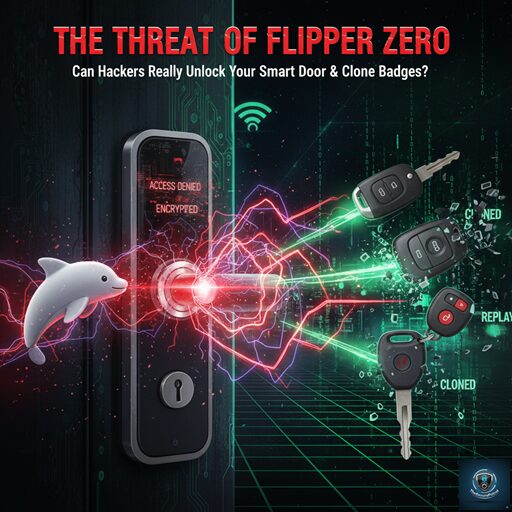
The Threat of Flipper Zero – Can Hackers Really Unlock Your Smart Door & Clone Badges?
A small, toy-like device, often described as a “multi-tool for geeks,” has captured global attention—and sparked serious anxiety among security professionals and homeowners alike. The device is the Flipper Zero, and its capability to interact with nearly every wireless protocol around us has ignited a crucial discussion about digital security. Is this tiny gadget a harmless penetration testing tool, or does it represent a genuine danger?
The truth is, the capabilities of this device are real, and understanding the core components of The Threat of Flipper Zero is the only way to defend against it. This comprehensive article dives into how the Flipper Zero works, details its ability to compromise smart doors and clone access badges, and provides actionable steps to protect your home and business against The Threat of Flipper Zero.
What is Flipper Zero and Why is it a Threat?
The Flipper Zero is an open-source, portable hardware device designed to explore and interact with digital access systems. It packs an arsenal of radio-frequency antennas into a plastic shell, making it an incredibly versatile penetration testing and hardware hacking tool.
The sheer combination of its capabilities is what makes The Threat of Flipper Zero so potent:
While its developers promote it for ethical hacking and learning, in the wrong hands, these combined features pose a clear and present Threat of Flipper Zero to older, poorly secured physical access systems.
Unlocking Doors: The Threat of Flipper Zero to Smart Locks
The Flipper Zero cannot magically bypass every smart door lock, but it exploits known weaknesses in common smart home communication protocols. This is where The Threat of Flipper Zero becomes directly relevant to your front door.
Exploiting Sub-GHz Frequencies
Many legacy smart locks, garage door openers, and gate remotes operate on static or predictable Sub-GHz radio signals. These fixed codes are highly vulnerable to a Replay Attack.
Modern smart locks should use Rolling Codes (or hopping codes), where the code changes every time the lock is used. However, cheaper or older models often fail to implement this protection correctly, leaving them exposed to The Threat of Flipper Zero.
Infrared (IR) Attacks
While less common for primary security, some low-security smart doors or secondary access systems still utilize IR. The Flipper Zero can easily learn and blast universal IR codes, making it simple to bypass systems that rely on legacy IR remotes.
The Cloning Crisis: Flipper Zero and Access Badges
Perhaps the most practical and immediate element of The Threat of Flipper Zero in commercial and residential settings is its ability to clone access badges.
Low-Frequency (LF) RFID Cloning
This is the Flipper Zero’s strongest suit. Most common apartment keys, basic gym membership fobs, office entry cards (e.g., HID Prox cards), and parking passes operate on the LF (125 kHz) frequency.
This renders the physical security of a building useless, as the barrier is simply bypassed by the cloned card. This ease of replication is a major pillar of The Threat of Flipper Zero facing corporations today.
High-Frequency (HF) NFC Limitations
The good news is that modern, encrypted cards (like most transit cards, highly secure corporate badges, and contactless payment methods) operate on HF NFC (13.56 MHz). These cards use strong encryption and require a cryptographic handshake that the Flipper Zero, in its standard form, cannot easily break or clone without additional hardware and significant computational power.
In the Threat of Flipper Zero landscape, the primary danger lies in the millions of older, unencrypted LF systems still in use globally.
Defending Against the Threat of Flipper Zero
Mitigating The Threat of Flipper Zero doesn’t require complex hacking knowledge; it requires smart purchasing and common-sense security upgrades.
Upgrade to Rolling Code Security
Ensure all your remote-operated access points—garage doors, gates, and smart locks—utilize encrypted rolling codes. This prevents a simple Replay Attack, rendering the Flipper Zero’s basic recording function useless.
Encrypt Access Badges
Replace old, unencrypted 125 kHz RFID badges and fobs with modern, highly secure NFC or encrypted high-frequency cards. Look for systems that use advanced protocols like MIFARE DESFire or require multi-factor authentication.
Prioritize Physical Defense
Remember that Flipper Zero only works wirelessly. Reinforce physical security measures to counter the potential success of the Threat of Flipper Zero:
Implement Multi-Factor Authentication (MFA)
For high-security areas, require more than just a badge. Pair badge access with a PIN code or biometric scan. A Flipper Zero can clone a card, but it cannot clone a fingerprint.
The Flipper Zero is a powerful reminder that any device communicating wirelessly is potentially susceptible to external manipulation. While it has democratized ethical hacking education, it has also unveiled critical, widespread vulnerabilities in older access control systems.
The Threat of Flipper Zero is real, but it is not a magical hacking wand. It exploits lazy security and outdated technology. By migrating to encrypted rolling codes and modern, multi-factor access control systems, homeowners and businesses can effectively neutralize The Threat of Flipper Zero and build a truly resilient physical security perimeter.
Unlocking the Beast: The Ultimate Guide to the Best Flipper Zero Applications in 2025
The Flipper Zero has taken the tech world by storm. It’s not just a “Tamagotchi for hackers”; it is a sophisticated multi-tool for geeks, penetration testers, and hardware enthusiasts. However, the hardware is only half the battle. To truly unlock the potential of this dolphin-themed device, you need the right software.
We dive deep into the ecosystem of Flipper Zero applications, exploring the best tools available on GitHub, the official app store, and custom firmware repositories in this guide.
What Makes Flipper Zero Apps Special?
Unlike closed ecosystems, Flipper Zero runs on open-source principles. Its operating system allows developers to create .fap (Flipper Application Package) files that can control the device’s radio modules, GPIO pins, and infrared sensors.
Whether you are auditing a network, cloning an access card for work, or simply playing Doom on a tiny screen, there is an app for that.
Top 5 Must-Have Flipper Zero Applications
If you have just unboxed your Flipper or updated your firmware via qFlipper, these are the first applications you should install.
1. WiFi Marauder (ESP32)
For many, this is the “killer app.” The Flipper Zero doesn’t have a native WiFi chip strong enough for auditing, but when combined with the WiFi Devboard, the WiFi Marauder app turns the device into a powerhouse.
2. Sub-GHz Remote & Playlist
The Sub-1 GHz radio is the Flipper’s most versatile hardware feature. While the stock app is great, third-party “playlist” apps allow you to store and replay multiple signals rapidly.
3. Authenticator (2FA)
Security isn’t just about breaking in; it’s about keeping people out. The Authenticator app turns your Flipper Zero into a hardware token for Two-Factor Authentication (TOTP).
4. BadUSB Demos
The Flipper can emulate a keyboard and mouse (HID). BadUSB apps allow you to run scripts (DuckyScript) instantly when plugged into a computer.
5. Amiibo Emulators (NFC)
On the lighter side, the Flipper’s NFC module is incredibly popular among gamers. Apps that manage NFC dumps allow users to emulate “Amiibos” for Nintendo Switch consoles.
Games on Flipper Zero: Can It Run Doom?
Yes, it can. The Flipper Zero community has ported several classic games to the monochrome screen. While not practical for long sessions, they are technically impressive feats of coding.
How to Install Flipper Zero Apps
Installing applications has become much easier with the launch of the Flipper Mobile App (iOS and Android).
A Note on Custom Firmware (Unleashed & Xtreme)
To get the most out of Flipper Zero applications, many advanced users switch from the Stock Firmware to custom versions like Unleashed or Xtreme.
Use Responsibly
The Flipper Zero is a tool for learning and securing, not for malicious activities. The applications listed above are powerful, capable of interacting with the physical and digital world in ways few other handhelds can.
Always adhere to the Safe Harbor rules: only test hardware you own or have explicit permission to audit. Happy hacking!
Frequently Asked Questions (FAQ)
Q: Are Flipper Zero apps free? A: Yes, the vast majority of apps are open-source and free to download from GitHub or the official app hub.
Q: Do I need an SD card for apps? A: Yes. The internal memory of the Flipper Zero is very small. A microSD card is required to store application assets and databases.
Q: Is it illegal to use WiFi Marauder? A: Possessing the software is not illegal. However, using it to de-authenticate or attack networks you do not own is illegal in most jurisdictions.