Public Wi-Fi Security Measures – What You Need to Know in 2026
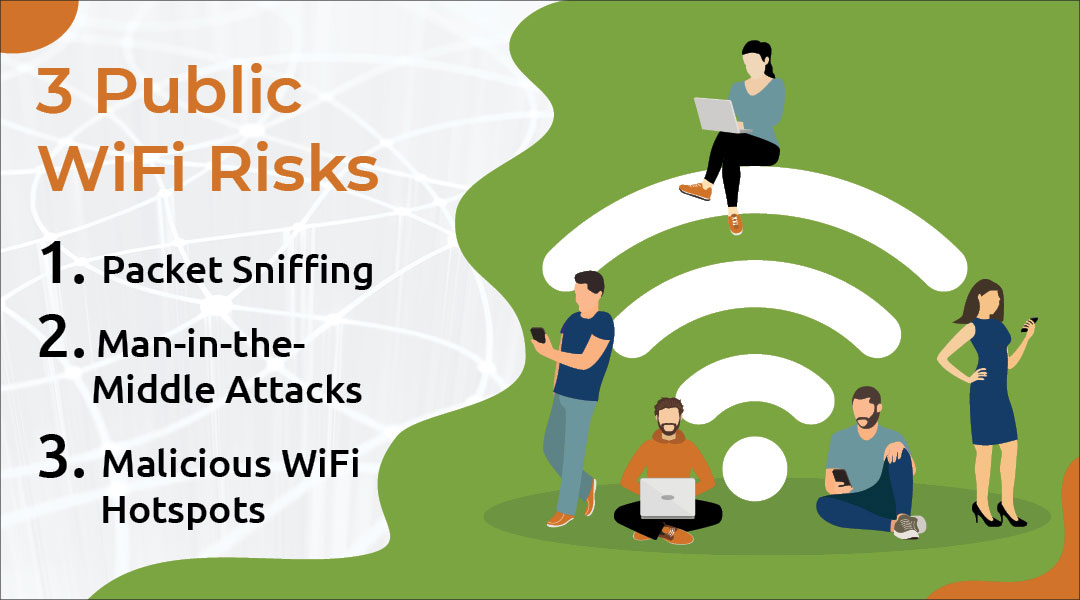
Public Wi-Fi Security, accessing free Wi-Fi at coffee shops, airports, and hotels is nearly unavoidable in 2026. However, this convenience comes with significant risks. Understanding and implementing essential public Wi-Fi security measures is no longer optional; it is mandatory for safeguarding your data, identity, and privacy. Without proper precautions, using public networks exposes users to threats like Man-in-the-Middle (MITM) attacks, malware distribution, and session hijacking. Effective public Wi-Fi security measures must address the latest methods employed by cybercriminals in a hyper-connected world.
The Inherent Danger of Public Networks
The core risk of public Wi-Fi lies in its architecture: the network is typically unencrypted and shared by everyone. This means that if one device on the network is compromised or if a hacker sets up a malicious access point (known as an “Evil Twin”), they can easily eavesdrop on the communication of all other connected users. This lack of inherent security makes robust public Wi-Fi security measures a personal responsibility.
Essential Public Wi-Fi Security Measures for 2026
To use public Wi-Fi safely, individuals must employ a layered approach to protection. These are the most critical public Wi-Fi security measures to adopt today:
Always Use a Virtual Private Network (VPN)
This is the single most important defense. A reliable VPN encrypts all the data flowing between your device and the internet, routing it through a secure server. This means that even if a hacker intercepts your data on the public network, they will only see meaningless, encrypted text. Making a VPN non-negotiable is the foundation of smart public Wi-Fi security measures.
Verify the Network Name (Avoid “Evil Twins”)
Never connect to a Wi-Fi network that looks suspicious or has generic names like “Free WiFi” or “Airport Guest.” Before connecting, always confirm the exact network name with an employee (e.g., the barista or hotel desk clerk). Connecting to a malicious “Evil Twin” network is a simple way for criminals to bypass most public Wi-Fi security measures.
Disable Automatic Connecting and File Sharing
Configure your device to “Ask to Join Networks” and turn off any file-sharing or public network discovery settings. This prevents your device from automatically connecting to compromised networks and keeps your locally stored files inaccessible to other users on the public Wi-Fi. These simple settings are crucial public Wi-Fi security measures.
Use HTTPS Only
Always ensure that websites you visit, especially those requiring logins (banking, email, social media), use HTTPS (indicated by the lock icon in the address bar). HTTPS encrypts the connection between your browser and the website server. While a VPN covers all traffic, ensuring HTTPS usage provides a vital backup layer to your public Wi-Fi security measures.
Keep Software Updated
Ensuring your operating system, browser, and security software are fully updated patches known vulnerabilities that hackers often exploit to gain access to devices connected to public networks. Software patches are passive but essential public Wi-Fi security measures.
Making Security Your Priority
In 2026, convenience should never trump security. By consistently applying these effective public Wi-Fi security measures, you can minimize your risk and enjoy the convenience of public internet access without sacrificing your digital safety.
Free Wi-Fi can be dangerous. Learn the 2025 risks of public networks (MitM, Rogue APs) and the essential security measures like VPNs, WPA3, and 2FA to keep your data safe.
Why ‘Free’ Wi-Fi Can Cost You Dearly
Internet access has become an indispensable part of our daily lives. Public Wi-Fi networks in cafes, airports, hotels, and even on public transport make seamless connectivity possible. However, this convenience comes with a serious security trade-off.
The danger of having our personal data, financial information, and even our identity stolen is a reality we must confront when using these networks. In this guide, we will explore the essential security measures you must take when using public Wi-Fi in 2025. As resources from the U.S. National Institute of Standards and Technology (NIST) emphasize, cybersecurity is no longer just the responsibility of experts—it’s the responsibility of every internet user.
The Core Risk: Hidden Dangers of Public Networks
The fundamental problem with public Wi-Fi is that networks are often unencrypted or use weak encryption. This setup allows cybercriminals to easily monitor network traffic and access sensitive data. A 2024 study revealed that 68% of public Wi-Fi users have faced at least one cybersecurity risk. Here are the most common threats awaiting you:
Unencrypted Traffic and Data ‘Snooping’
Many free networks don’t encrypt your data at all. This means anyone on the same network (with the right tools) can “snoop” on your activity. Data sent over HTTP (not the secure HTTPS), such as usernames and passwords, can be read like an open book. While HTTPS is more secure, the Electronic Frontier Foundation (EFF) constantly advocates for its universal adoption, as it’s not yet foolproof against all attacks.
Man-in-the-Middle (MitM) Attacks
In this scenario, a hacker secretly positions themselves between you and the website you’re trying to visit. You think you’re sending your password to your bank, but you’re actually sending it directly to the attacker first. The attacker can then steal, modify, or inject malicious code into the data before passing it along. The U.S. Cybersecurity and Infrastructure Security Agency (CISA) frequently issues warnings about this prevalent threat.
Rogue Access Points: The ‘Evil Twin’ Trap
Attackers set up fake Wi-Fi hotspots that look legitimate. For example, in a hotel with a network named “Hotel_Guest_WiFi,” an attacker might create a new, unsecured network called “Hotel_Guest_Free_WiFi.” The moment you connect to this “evil twin,” all your internet traffic is routed through the attacker’s device.
Pro Tip: Always verify the official network name and password with the staff at the hotel or cafe before connecting.
How to Stay Safe on Public Wi-Fi
Completely avoiding public Wi-Fi isn’t always practical. However, you can significantly minimize the risks by adopting these critical security habits.
Here is your essential checklist:
Rule #1: Always Use a VPN (Virtual Private Network)
A VPN is your single most powerful tool. It creates a “secure tunnel” by encrypting all your internet traffic. Even if you’re on a compromised public network, your data (passwords, messages, browsing history) is scrambled and unreadable to any snoopers. In 2025, using a reliable VPN (like ProtonVPN or others) is not a luxury; it’s a necessity.
Keep Your Firewall Activated
Your device’s operating system (Windows, macOS, Android, iOS) has a built-in firewall. Think of it as a security guard that controls incoming and outgoing network traffic. Ensure it’s always enabled to block unauthorized access and potential malware threats.
Keep Your Software Updated
Software updates aren’t just for new features; they are “digital patches” that fix security vulnerabilities. Outdated operating systems, browsers, and apps are easy targets. Enable automatic updates, especially for your antivirus software, to stay protected against the latest threats.
Enable Two-Factor Authentication (2FA)
For all your important accounts (email, banking, social media), enable 2FA. This means that even if a hacker steals your password, they still need a “second key”—a code sent to your phone—to log in. This simple step renders most password theft useless.
Avoid Sensitive Transactions
If possible, avoid performing critical activities like online banking, shopping, or accessing confidential work files on public Wi-Fi. It’s much safer to use your phone’s mobile data (4G/5G) for these transactions.
The Future of Security
As technology evolves, so do our security standards. In 2025 and beyond, we will see these advancements become more common, even in public spaces.
Wi-Fi 7 and WPA3: Stronger Encryption
The new Wi-Fi 7 standard, as defined by the Wi-Fi Alliance, offers more than just speed. It mandates the use of WPA3 (Wi-Fi Protected Access 3), a much stronger security protocol. WPA3 makes it significantly harder for attackers to crack passwords and perform MitM attacks, offering robust protection even on open networks.
AI-Powered Defense
Artificial Intelligence (AI) and Machine Learning (ML) are revolutionizing cybersecurity. AI-driven security systems can analyze network traffic in real-time, identify suspicious patterns, and automatically block threats—even new “zero-day” attacks that have never been seen before.
Biometric Authentication and a Passwordless Future
Passwords are the weakest link. Biometric authentication (fingerprints, facial recognition) combined with 2FA is paving the way for a passwordless future. Expect to see these stronger authentication methods become the standard for securing accounts and devices, making your stolen password obsolete.
Awareness is Your Strongest Password
Public Wi-Fi is a convenient tool that is here to stay. To use it safely, we must shift from a mindset of convenience to one of conscious security. Security isn’t a “set it and forget it” task; it’s an ongoing habit. By making a VPN your default, keeping your software patched, and remaining skeptical of “free” connections, you can navigate the digital world freely and, most importantly, safely.
Your defense against cyber threats starts not with a complex string of characters, but with a sharp, vigilant mind. Indeed, awareness is your strongest password—the ultimate barrier protecting your digital life. While technical measures are crucial, they are only as effective as the human factor behind them. To truly secure your data, you must understand the principles that make a truly strongest password and the surrounding ecosystem of digital safety.
The Anatomy of a Truly Strongest Password
What defines a modern, resilient strongest password? It’s a combination of physical attributes and behavioral practices.
Length and Complexity
Forget the old advice of changing your password every 90 days, which often led to simple, predictable updates. The current best practice is to make your password as long and complex as possible from the start.
Uniqueness is Paramount
Reusing the same password across multiple accounts is one of the biggest cybersecurity risks. If one service is breached, every other account using that password is immediately vulnerable—this is a technique called credential stuffing.
Strongest Password Management with Tools
With dozens of accounts, remembering a long, unique strongest password for each is impossible. This is where modern tools come in.
Beyond the Password: The Power of Digital Awareness
Even the most complex, strongest password can be compromised if you lack awareness of how threats operate. Awareness is the crucial layer that turns a good password into an impenetrable defense.
As a result, while a 16-character, unique, and complex string is technically the strongest password in terms of brute-force resistance, your true protection lies in your behavior. Make awareness your strongest password by adopting smart habits, using modern tools, and staying vigilant against social engineering threats. This holistic approach is the only way to safeguard your digital future.
Unmasking Threats and Fortifying Defenses
Wireless Network Threats – A Comprehensive Guide
Despite significant advancements in wireless network security, notably the introduction of WPA and WPA2 using CCMP after WEP, vulnerabilities persist. While data frames are now encrypted, management frames remain exposed, leaving networks susceptible to Denial of Service (DoS) attacks.
DoS Attacks on Wireless Networks
Wireless networks face various DoS attacks, some of which are unique to wireless environments. These attacks typically occur at the OSI model’s second layer, where communication happens through frames (Data Link Layer). Additionally, jammers can disrupt communication at the physical layer by distorting signals.
Common attack methods include authentication/association flood and deauthentication/disassociation flood.
The Authentication and Association Process
A client connects to an Access Point (AP) through a series of steps:
Authentication is necessary for association. A client can authenticate with multiple systems but can only associate with one AP at a time.
Targeted Attacks
To target a specific user, tools like airodump-ng or Kismet can identify users connected to the target wireless network before initiating an attack. These attacks can temporarily disrupt communication and may require restarting the AP.
Authentication and Deauthentication Attacks
An authentication attack can be launched using a specific command. Deauthentication attacks are relatively simple to execute. Tools like mdk3 can send spoofed frames to a broadcast MAC address, disconnecting all clients from the wireless network.
Association Flood Attacks
An AP maintains a table for each associated client. In an association flood attack, the goal is to fill up the limited memory of this table, preventing new clients from connecting. This is achieved by sending continuous association requests to the AP with constantly changing MAC addresses.
Bypassing MAC Address Filtering
MAC address filtering is a security measure that allows only specified MAC addresses to connect to the wireless network. However, this protection can be bypassed by identifying and cloning the MAC addresses of authorized users.
Using tools like airodump-ng, information about users connected to the target wireless network can be captured. By cloning the MAC address of an authorized user, an attacker can bypass MAC address filtering and connect to the network.
For more detailed information on wireless network security, you can refer to authoritative sources like the US-CERT website.