Detecting PrintNightmare Vulnerability: A Comprehensive Guide
Understanding the PrintNightmare Vulnerability
The PrintNightmare vulnerability emerged as a critical Windows Print Spooler security flaw, accidentally disclosed by Chinese researchers. This zero-day vulnerability affects all Windows versions, allowing remote code execution. The vulnerability arises from a critical error in the Windows Print Spooler service, putting Windows operating systems at significant risk.
The Accidental Leak
Researchers at Sangfor planned to detail multiple zero-day vulnerabilities in the Windows Print Spooler service at the annual Black Hat security conference. However, due to an error, the proof-of-concept (POC) code was inadvertently released to the public. Although the code was only briefly available, it was quickly copied by many individuals.
Exploiting the Vulnerability
Threat actors can exploit this vulnerability to easily take over a corporate network. By seizing control of a Windows domain server, they can gain full control over the entire system, highlighting the critical nature of this issue. The PrintNightmare vulnerability, identified as CVE-2021-34527, allows attackers to execute remote code on Windows systems and currently has no patch, making it a critical vulnerability.
Impact of the Vulnerability
The security flaw enables attackers to execute remote code, allowing them to install malicious applications, alter data, and create new accounts with full administrative rights. They can even take over an Active Directory machine on your network. This zero-day vulnerability affects all Windows versions, including endpoints and servers.
PrintNightmare Vulnerability Detection Tool
After the exploit code for the PrintNightmare vulnerability was made public, the Privia Security Cyber Security Team developed a detection tool for our corporate customers. This tool helps detect potential attack attempts on systems where printer services are essential.
Application and Source Codes
The PrintService/Operational event logs are disabled by default on Windows Server 2016 operating systems. The tool activates these logs upon first run, enabling the detection of attacks. When you launch the application with administrative privileges, it creates a PowerShell script named “enableSpoolerLog.ps1” in the application’s working directory. This script is then executed via PowerShell to activate the “PrintService/Operational” log. By default, the script allows for 2056 KB of logging. If you use a heavily trafficked print spooler service, we recommend increasing the file size.
Detection Mechanism
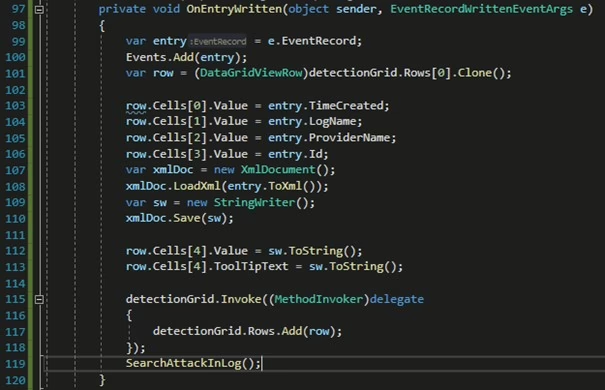
Once the application is run with administrative rights and the logging for the Spooler service is activated, the “StartEventLogHook” method is triggered. This method calls the EventLogWatcher class to start monitoring the specified log file. When a new log is created, the “OnEntryWritten” method is called.
The “OnEntryWritten” method sends data to the datagrid in the application interface, displaying it on the screen and triggering the alert mechanism. After sending data to the “detectionGrid” datagrid, the method searches for Event IDs to detect the attack event with ID “316”.
Upon detecting the event log with ID 316, the attack is identified, and the details are saved as a log file in the application’s working directory.
Protecting Against the PrintNightmare Vulnerability
The security flaw allows attackers to execute remote code, enabling them to install malicious applications, alter data, and create new accounts with full administrative rights. They can even take over an Active Directory machine on your network. The PrintNightmare zero-day vulnerability is a critical Windows flaw affecting all versions, including endpoints and servers.
Microsoft has acknowledged that the vulnerable code is present in all Windows versions. The Print Spooler service runs by default on Windows, including client versions, Domain Controllers, and many Windows Server instances.
Mitigation Strategies
First Method: Disable the Print Spooler service wherever possible and restrict access to Print Spooler services on systems where it cannot be disabled.
Second Method: Use group policy to disable remote printing functions.
You can access the PrintNightmare Vulnerability Detection Tool and its source codes from our GitHub address: PrintNightmareDetectionTool on GitHub.