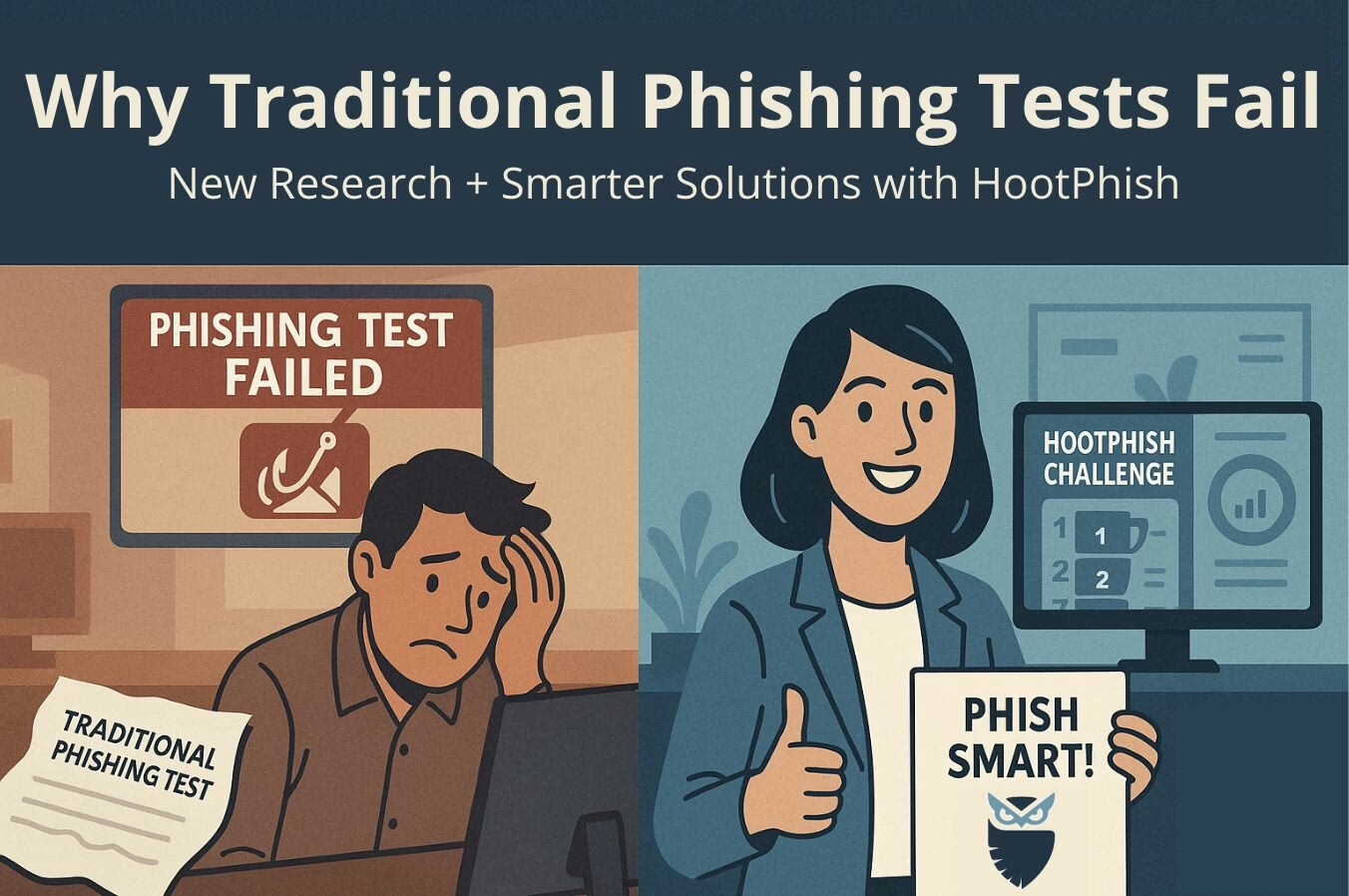
Why Old-School Phishing Tests Fail and How to Fix Them
Why Traditional Phishing Tests Miss the Mark
For years, companies have used simulated phishing emails to test how well employees can spot phishing attacks. But new research shows these old-school methods might be doing more harm than good. A study presented at Black Hat USA 2025 by security experts from the University of Chicago and the University of San Diego found that traditional phishing training methods just don’t work—and they might even backfire.
Key Findings from the Black Hat Study
The study looked at how well phishing awareness training works over time. It turns out that traditional phishing simulations, especially those that rely on shaming or punishing employees, don’t actually make people better at spotting phishing attempts. Instead, they often lead to:
- User fatigue and disengagement: Employees get tired of the same old tests and stop paying attention.
- Desensitization to phishing cues: People start ignoring the warning signs of phishing because they see them so often.
- Workplace resentment and fear of failure: Employees feel stressed and anxious, which makes them less likely to engage with the training.
In short, the “gotcha” approach makes people more anxious and less likely to learn anything useful.
Introducing HootPhish: A Game-Changing Solution
At CyberHoot, we think there’s a better way. Our HootPhish platform skips the punishment and focuses on positive reinforcement and rewards. This approach keeps employees engaged, empowered, and ready to change their behavior for the better.
How HootPhish Solves the Problem
HootPhish tackles the issues raised by the Black Hat researchers with some innovative features:
- Positive Reinforcement Over Punishment: Instead of shaming employees who fail, HootPhish offers immediate, friendly education, turning mistakes into learning opportunities.
- High Engagement User Participation: Unlike traditional tests that only track email opens and clicks, HootPhish includes all users in the results, giving a full picture of how everyone is doing.
- Gamified Challenges: With the HootPhish Challenge, users get randomized phishing simulations and leaderboard-based scoring, making the whole process more engaging and competitive.
- Gamification: HootPhish uses avatars to represent cyber literacy knowledge and progress, making cybersecurity training more enjoyable.
- Measured Behavior Change: HootPhish doesn’t just test users—it trains them, tracking their improvement over time to help organizations prove ROI and meet compliance mandates.
Why HootPhish Stands Out
HootPhish assignments are ready to go with no setup or allow-listing needed, making it one of the most automated solutions out there for administrators.
Download Our Whitepaper
We’ve put everything you need to know into one easy-to-read whitepaper. Inside, you’ll learn:
- Why click-based metrics are dangerously incomplete
- How 6 or 7 visual cues are used in every HootPhish simulation to teach a rubric
- The science behind positive reinforcement in security awareness
- Real-world data showing better engagement and improved outcomes
Final Thoughts
The evidence is clear: traditional phishing simulations that rely on fear and punishment just don’t work. The Black Hat research confirms this. Our patent-pending approach is based on 75 years of psychological research on behavioral change and offers a smarter, more effective way to defend against phishing.
If you’re ready to move beyond old-school testing and towards a more effective phishing defense, we’re here to help. Learn more about HootPhish and secure your business with CyberHoot today.
Understanding Phishing Attacks
Phishing attacks are a pervasive threat that every internet user should be aware of. In simple terms, phishing is a type of social engineering that tricks users into actions that compromise their computer, identity, or network. These attacks often come in the form of emails that lure users into clicking malicious links, potentially giving hackers access to account credentials or even remote control of their computers.
The Importance of Phishing Awareness
Phishing attacks account for nearly 90% of cyber attacks on businesses. Despite this, many Small to Medium-sized Businesses (SMBs) have not yet trained their employees on cybersecurity. This lack of training puts these businesses at significant risk of falling victim to phishing attacks. With the increase in remote work due to the COVID-19 pandemic, hackers have intensified their phishing efforts, using devious and convincing social engineering tactics.
Defending Against Phishing Attacks
Phishing attacks make it easy for hackers, as victims often unknowingly hand over sensitive information or grant access to their networks. The most effective way to defend against these attacks is through comprehensive cybersecurity awareness training. Here are some steps businesses can take:
- Train Employees: Educate your staff on how to spot, avoid, and delete phishing emails.
- Phish Testing: Regularly test your employees with simulated phishing attacks and provide additional training to those who fail.
- Password Managers: Purchase and train your employees on using password managers. These tools can prevent users from entering credentials on phishing websites.
- Email Protection: Set up SPF, DKIM, and DMARC records to protect your domain from being used in phishing attacks.
Effective Staff Training
One of the best ways to train staff is through phish testing. Platforms like CyberHoot allow administrators to create phishing campaigns to test employees. CyberHoot offers various templates that mimic emails from well-known domains like Google, Amazon, Microsoft, and even government entities related to COVID-19.
CyberHoot’s phishing tests help identify which users are opening emails, clicking on links, and entering sensitive data. This allows businesses to pinpoint their weakest links and provide targeted remedial training before a hacker succeeds in breaching their systems.
Taking Action
To ensure your business is protected, consider signing up with CyberHoot today. Their platform offers comprehensive tools to train and test your employees, helping you sleep better knowing your staff is cyber-aware and vigilant.
For more information on setting up a phishing campaign, you can watch a short video tutorial.
Phishing attacks are a significant threat, but with the right training and tools, businesses can protect themselves effectively. By educating employees and regularly testing their awareness, companies can significantly reduce the risk of falling victim to these malicious attacks.
Why Are Employees Still Falling for phishing?
Phishing is one of the most effective, most common and most human-centered tactics of cyber attackers. Phishing attacks via email, SMS, instant messaging or fake websites target human psychology and workflows rather than technical weaknesses. So why do employees still fall into phishing traps when there are modern security tools and awareness training? In this article, I take an in-depth look at the “why” question and explain item by item the concrete, feasible measures that institutions can take.
Why does phishing still work?
Phishing’s success is based primarily on three principles: human psychology works for the malicious, attacks constantly evolve, and processes/systems within the organization are sometimes vulnerable. Technical solutions help, but alone are not enough; The combination of human behavior, organizational culture, and attackers’ creativity makes the attack effective.
Human factors — psychological traps
The fundamental power of phishing is based on predictable tendencies in human minds:
Technical and operational deficiencies
There are a number of technical and processual shortcomings that fuel human error:
Evolving tactics of the attacker
Phishing attacks have now become much more sophisticated than simple, poorly written emails:
Attackers can produce much more believable messages through social media, data leaks, and information they collect from public sources (organization schemes, holidays, events).
Why are corporate culture and education alone not enough?
Mindfulness training has become common, but there are some common pitfalls:
Real life example (fiction but typical)
A financial employee receives an email from his boss titled “URGENT: confirm supplier payment”. The message is written sincerely and in the style of the boss; Additionally, there is a fake invoice attached. In the busy work schedule, the employee does not notice the small difference in the email address and follows the payment instruction. Result: Thousands of dollars go to a different account. This scenario is repeated in thousands of companies every year. The — error is not technical, but procedural and social engineering.
Steps to creating phishing-resistant institutions
The following strategies are effective when implemented together. One alone is not enough; A multi-layered approach is essential.
Technical measures (mandatory basis)
People & process oriented measures
Organizational changes
What should the training content be like? (Practical suggestions)
How do you measure simulation results?
Important: Do not use simulations to embarrass employees; data should be used for improvement.
Possible objections and answers
Quick action list (For the first 90 days)
Long-term goals (in 1 year)
Result — why are they still falling and what to do?
Employees still fall into phishing because attacks target human nature, organizational processes sometimes show vulnerabilities, and attackers are constantly renewed. Dealing with this requires not only technology but also human-centered designed training, positive incentives, well-structured processes and continuous measurement. Institutions achieve success if they see security as a continuous cultural transformation, not a “one-time project”.
How to Spot a Phishing Email – 5-Step Checklist
Learning how to Spot a Phishing Email is one of the most critical cybersecurity skills you can acquire in the digital age. Phishing attacks remain the leading cause of data breaches, targeting individuals and organizations alike with deceptive messages designed to steal credentials, financial information, or deploy malware. With a simple, systematic approach, you can significantly reduce your risk. This comprehensive 5-step checklist will teach you exactly how to Spot a Phishing Email quickly and effectively, transforming you from a potential victim into a vigilant defender.
Why Knowing How to Spot a Phishing Email is Crucial
Phishing emails rely on social engineering, manipulating human trust or urgency to bypass technical defenses. Attackers constantly refine their tactics, making it harder to discern legitimate communications from malicious ones. However, by applying this checklist, you’ll be well-equipped to Spot a Phishing Email before it causes damage.
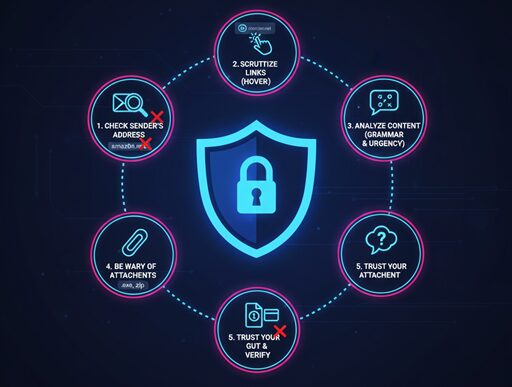
Your 5-Step Checklist
Step 1: Check the Sender’s Email Address and Name
This is often the quickest giveaway for how to Spot a Phishing Email. Don’t just look at the displayed name; examine the actual email address.
Step 2: Scrutinize Links Before Clicking (Hover, Don’t Click!)
Malicious links are the primary delivery mechanism for phishing attacks. This step is vital for how to Spot a Phishing Email.
Step 3: Analyze the Email’s Content for Red Flags
The body of the email often contains tell-tale signs for how to Spot a Phishing Email.
Step 4: Evaluate Unexpected Attachments
Attachments are a common way for malware to be delivered. Be very cautious.
Step 5: Consider the Context and Be Skeptical
Sometimes, all the technical indicators might look “clean,” but something just feels off. Trust your gut. This is the final step in how to Spot a Phishing Email.
By systematically applying this 5-step checklist, you will significantly improve your ability to Spot a Phishing Email and protect yourself from one of the internet’s most persistent and dangerous threats. Stay vigilant, stay safe!
Don’t be a victim. Scammers are getting smarter, but their tricks are easy to spot. The Secure Patrol gives you a simple 5-step checklist to identify and delete any phishing email in seconds.
It’s 9 AM on a Tuesday. An email lands in your inbox. Subject: Urgent: Your Amazon Account Has Been Locked.
Your heart jumps. You’re expecting a package. You click the link to “Verify Your Account,” and just like that, the trap snaps shut.
This is phishing—digital bait used by con artists to steal your passwords, credit card numbers, and personal identity. These scams are no longer sloppy, misspelled jokes. They are sophisticated, targeted, and dangerously effective.
As TheSecurePatrol.com, our job is to put you on watch. We see these threats every day. The good news? Once you know the warning signs, these fakes become glaringly obvious.
Here is your official 5-Step Patrol Checklist to spot a phishing email and protect your inbox.
Step 1: Interrogate the Sender (Don’t Trust the Name)
This is the number one red flag. Scammers are experts at making an email look official.
A legitimate email from Microsoft will come from an address ending in @microsoft.com. A scammer’s email will be a jumbled mess designed to look similar.
- Real:
support@paypal.com - Fake:
paypal.support@secure-login-1a.netormicros0ft-security@outlook.com
If the email address looks weird, it is weird. Delete it.
Step 2: Look for the Emotional “Hook” (Urgency & Fear)
Scammers don’t want you to think. They want you to panic. They create a false sense of urgency to rush you into making a mistake.
Look for these classic emotional triggers:
Real companies don’t operate this way. Your bank will never email you threatening to close your account over an “urgent” link. They will use secure, on-site messages. If it feels like a threat, it’s a test. Don’t fail it.
Step 3: The Hover-Before-You-Click Test (Expose the Real Link)
This is the most important technical skill you can learn. Just like the sender’s address, the links in the email are designed to deceive.
That blue “Sign In Now” button might look like it goes to your bank, but it almost certainly doesn’t.
If the link looks suspicious (like bit.ly/3xYqzb or amazon-login.secure-site.xyz), it’s a scam.
Step 4: Spot the “Off” Details (Bad Grammar & Weird Logos)
This is the classic sign, but it’s still surprisingly common. Read the email carefully.
Major corporations like Amazon, Apple, or Google have entire teams of editors. Their emails are flawless. Scammers’ emails, which are often translated or written quickly, are frequently full of mistakes.
Look for:
These details are the digital “tells” of a con artist.
Step 5: Treat Attachments Like Ticking Bombs
Let’s be crystal clear: Never, ever open an unexpected attachment.
This is the primary way that ransomware (software that locks up your computer and demands money) is spread. Scammers will disguise these files as something harmless:
Invoice.pdfShipping_Details.zipUpdated_Policy.docx
Unless you were 100% expecting that specific file from that specific person, do not open it. No legitimate company will send you critical updates in a random .zip file.
“Patrol Report: What If I Already Clicked?”
Okay, you clicked. Don’t panic, but act fast.
Trust Is Earned
Your inbox is your digital front door. These 5 steps are your locks, your peephole, and your alarm system. The golden rule of The Secure Patrol is simple: Be skeptical. Trust is earned, and 99% of unsolicited emails haven’t earned it.
The Alarming Rise of AI-Powered Phishing Kits – A Growing Cyber Threat
AI-Powered Phishing Kits – Gone are the days when phishing emails were easy to spot due to poor grammar, suspicious links, and obvious scams. Today, a new generation of AI-powered phishing kits has emerged, making cyber attacks smarter, faster, and more convincing than ever before. According to The Hacker News, these advanced tools automate phishing campaigns that once required weeks of planning and execution by skilled hackers.
The Evolution of Phishing Kits
Modern phishing kits are no longer simple fake login pages. They have evolved into sophisticated, full-stack attack platforms that leverage AI to create highly convincing emails and web pages. These messages appear to come from legitimate sources like Microsoft, Google, or even your own IT team, making it nearly impossible to detect based on language errors alone.
Key Features of AI-Powered Phishing Kits
The Struggle of Traditional Defenses
Traditional security measures such as spam filters, signature-based detection, and fear-based security awareness training are no longer sufficient. Attackers are optimizing phishing campaigns with the same precision that businesses use for marketing funnels, resulting in higher click rates and better conversion rates.
Effective Strategies to Combat AI-Powered Phishing
The Big Takeaway
AI has not invented phishing but has significantly scaled its impact. These new phishing kits lower the skill required for attackers while raising the difficulty for defenders. The goal is to build a workforce that thinks critically, verifies instinctively, and reports confidently when something feels off. Prevention through awareness is key, not perfection through fear.


