Must-Have Network Tools for Every Cybersecurity Pro
Mastering Network Utilities: A Cybersecurity Essential
In the dynamic world of cybersecurity, having a firm grasp on key network utilities is non-negotiable. We’ve previously explored IP addresses, network protocols, and ports. Today, we’re going to dive into some indispensable network utilities that every cybersecurity professional should have in their toolkit. Some of these tools operate via GUI on Windows, while others run on Unix/Linux through the command line. Aspiring cybersecurity professionals should be proficient in both Windows and Linux operating systems. So, let’s explore some basic network commands and applications that work on both platforms.
The Ipconfig Command: Your Network’s Vital Signs
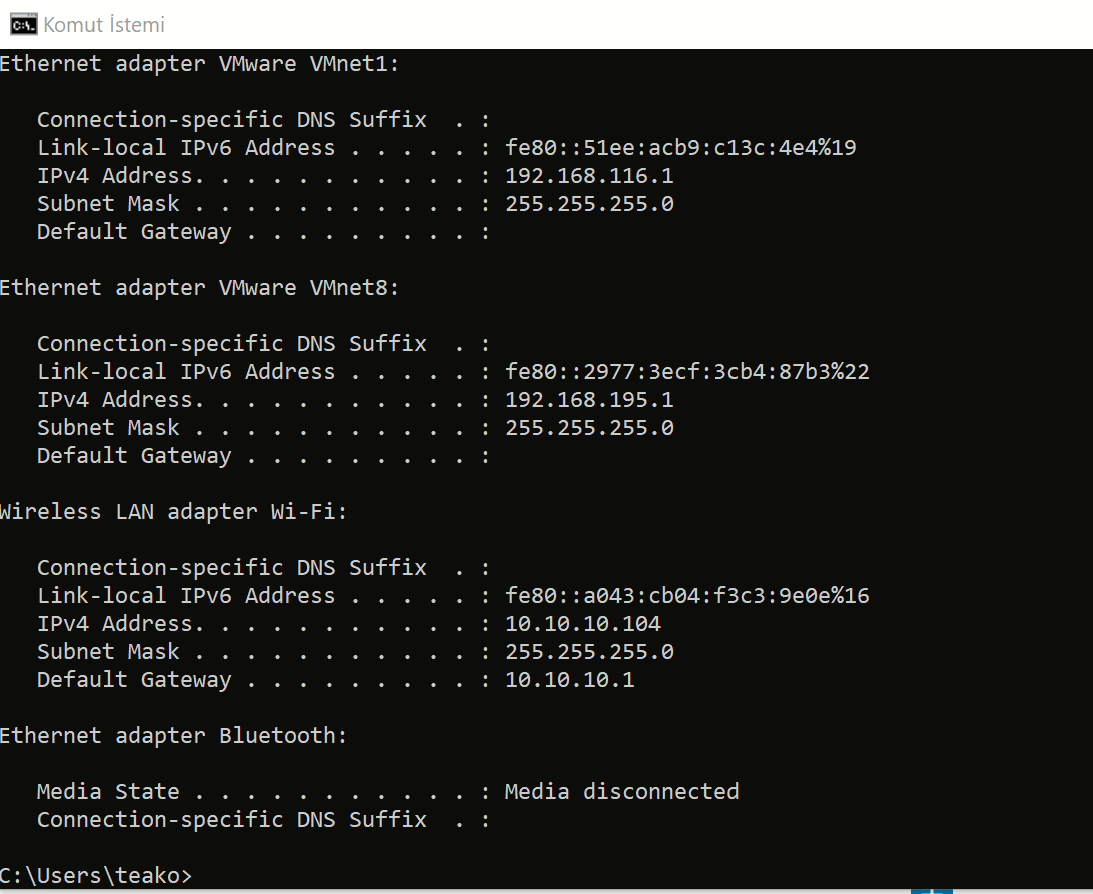
Even on your personal computer, you’ll often find yourself connected to different networks. Before attempting to secure or infiltrate a system, it’s crucial to gather intel about your computer’s network configuration. The first step in this process is running the ipconfig command on the console. This command provides vital information about your network connection, including your IP address within your internal network and the IP address of your default gateway, which connects you to the outside world.
Running the ipconfig command is the initial step in determining your system’s network configuration. Many commands, including ipconfig, have parameters or flags that can be used to obtain specific details about your computer’s configuration. The most commonly used method is likely ipconfig /all, which displays your entire network configuration, showing all the details of your network cards.
The Ping Command: Testing Network Reachability
Another widely used network command is ping. This command sends a test packet to determine if a machine is reachable and measures the time it takes for the packet to reach the machine and return. With this command, we can gather information from the response received from the target system.
The ping command shows that a 32-byte echo packet is sent to the target and returned. TTL (Time To Live) indicates the life cycle or waiting time of the packet. This time unit shows how many intermediate steps or hops the packet must go through to reach the target before being canceled. The Internet is a vast network of interconnected networks, and your packet will likely pass through several points to reach its destination. The time displayed shows how long it takes for the response to reach you. The statistics provided at the end indicate whether there is any packet loss and the average times. A response with zero loss suggests that there is no problem between your network connection and the target system. In some cases, you’ll see packet losses, indicating issues in your network or between networks, where some packets cannot reach the other side or cannot return to you.
The Tracert Command: Mapping the Network Path
Think of the tracert command as a souped-up version of ping. Tracert not only shows whether the packet reaches its destination and how long it takes, but also all the intermediate hops required to get there. As mentioned earlier, in the ping command, the response comes through many points. Tracert informs you of these transit points. In Linux or UNIX, the same command is used as traceroute instead of tracert.
With Tracert, you can see the IP addresses of each intermediate hop and how long it takes (in milliseconds) to reach that hop. Knowing the steps required to reach a destination can be very important for cybersecurity experts, as it allows them to map the network path and identify potential vulnerabilities or bottlenecks.
The Netstat Command: Monitoring Network Connections
Netstat is another valuable network command, short for Network Status. Essentially, this command displays the current connections your computer has. If you see a few connections, don’t panic; it doesn’t necessarily mean hackers have infiltrated the system. You’ll often see many private IP addresses, indicating that internal communication is ongoing within your network. These connections represent your browser, applications, and other communications.
While there are other utilities available for working with network communication, the four basic utilities we’ve reviewed—ipconfig, ping, tracert, and netstat—are among the most important. These tools are absolutely essential for any network administrator or cybersecurity professional, and each has its own specific parameters for advanced usage.
For further reading, you can check out this authoritative resource on cybersecurity.