Beware of Fake CAPTCHA Traps: The Hidden Threat to Your Cybersecurity
Unmasking Fake CAPTCHA Traps
In the ever-evolving digital landscape, fake CAPTCHA screens have surfaced as a cunning ploy by cybercriminals. Their goal? To dupe users into downloading and running harmful software. CAPTCHAs, which stand for Completely Automated Public Turing tests to tell Computers and Humans Apart, are meant to separate humans from bots. They’re typically used in user logins, file downloads, and form submissions. However, cybercriminals have found a way to exploit this security measure, creating fake websites that ensnare unsuspecting users, particularly employees within organizations.
How Fake CAPTCHAs Operate
Fake CAPTCHAs usually pop up on fraudulent websites that users visit to access content, download files, or perform other tasks. These deceptive CAPTCHAs often present users with seemingly innocuous tasks like “Check the box to verify you are not a robot” or “Enter the instructions from the image.” However, clicking on these CAPTCHAs sets off a chain of malicious activities.
Research by the Privia Security Defense team reveals that fake CAPTCHAs are being used to spread a malicious software called “Lumma Stealer.” This malware uses new techniques to evade detection and targets unsuspecting users. Once the malicious code is executed, it gives cybercriminals access to the victim’s identity information, financial data, and other sensitive details. These stolen data are often sold on illegal internet forums.
The Inner Workings of Fake CAPTCHA Attacks
Unlike genuine CAPTCHAs, which use methods like image selection, math problems, and text matching to verify users, fake CAPTCHAs take a different approach. Instead of solving the CAPTCHA, users are tricked into performing tasks that execute malicious code on their systems.
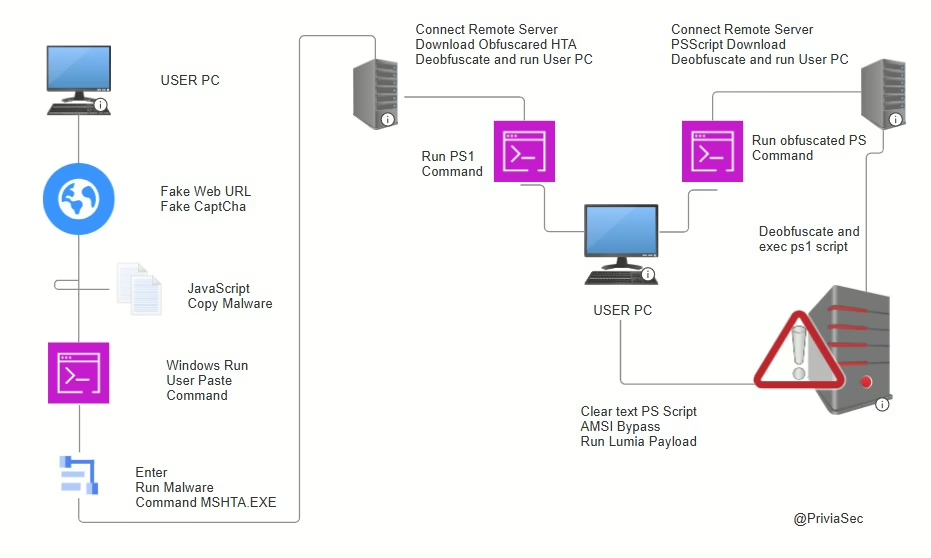
Upon examining the source code of a fake website, it’s clear that clicking on the fake CAPTCHA first copies the malicious code to the user’s system. The user is then presented with a series of tasks designed to execute the copied malicious code. These tasks typically involve pressing specific key combinations, such as Windows + R to open the “Run” application, followed by CTRL + V to paste the copied code, and finally pressing ENTER to execute the code.
The Execution of Malicious Code
When the user completes these tasks, the malicious code is executed using PowerShell. The Privia Security Defense team has found that this process involves connecting to a command and control server through PowerShell and Mshta.exe. This activity triggers an alert for Remote HTA File Execution Via PowerShell, indicating that PowerShell is used to launch Mshta and execute a remote HTA file.
The associated alert includes MITRE ATT&CK tactics such as command and control, defense evasion, execution, and techniques (T1059.001, T1105, T1218.005). During this process, the malicious code writes several files to the system and accesses numerous registry keys. These files are often obfuscated to avoid detection by antivirus software, making it difficult for Endpoint Protection Platforms (EPP) and Endpoint Detection and Response (EDR) products to identify the malicious activities.
Data Theft and Illegal Sales
Once executed, the malicious code allows cybercriminals to steal sensitive data using tools like Lumma Stealer. This data is then sold on illegal forums. Fake CAPTCHAs are a creative and attention-grabbing social engineering tactic designed to trick users into willingly downloading and executing malicious software.
Encrypted PowerShell codes are used to bypass anti-malware techniques and download malicious software in the background, evading browser-based cybersecurity controls. This method serves as an anti-analysis mechanism, making it challenging for security measures to detect and prevent the attack.
Protecting Yourself from Fake CAPTCHA Traps
To safeguard yourself from fake CAPTCHA traps, it’s crucial to stay vigilant and adopt safe browsing habits. Here are some tips:
- Be wary of websites that ask you to complete CAPTCHAs for no apparent reason.
- Never download files or click on links from untrusted sources.
- Keep your antivirus software and operating system up to date.
- Use a reputable ad-blocker to prevent malicious ads from appearing.
- Educate yourself and others about the dangers of fake CAPTCHAs and how to spot them.